Release Notes - LTS
9 Jul 2026
This is our newest Long Term Support software version! We are delighted to share the newest features with you.
Upgrade Instructions
It is strongly recommended to use LTS versions for a more reliable operation. Updating it when reaching its end of life is also a good practice especially for applications that are connected to our cloud services.
New Developments
We have added powerful new developments to enhance performance and usability. Here’s what’s new in this update.
Auto Steering
Automatic Maneuver
-
When Auto Steering and Auto Turn are enabled, the system can automatically perform the turning maneuver at the headland, moving from the current row to the next target row without manual steering.
-
To know more about the Auto Turn read this documentation.
MPC Trajectory Controller
-
Model Predictive Controller (MPC): Improved curve handling and predictive control for smoother, more precise transitions when entering or exiting curves and headlands. This model for complex maneuvers is available upon activation (through support).
-
MPC Interface: Operation View now displays dedicated MPC Auto Steering information when the MPC controller is enabled.
-
Horizon: is the primary tuning control, set in seconds (0–10 s), representing how far ahead the controller predicts the trajectory.
-
Smoothness: is the control that lets you adjust the aggressiveness of steering changes; lower values respond more abruptly, whereas higher values make steering smoother and more gradual.
-
The MPC-specific panel replaces the Autopilot Legacy panel only while MPC is active, ensuring that operators view parameters relevant to MPC rather than the previous gain settings.
-
Global
-
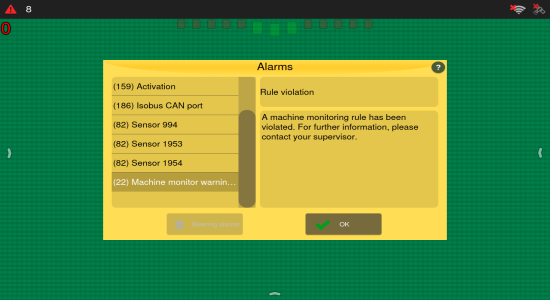
Alarm type added to notification and detailed view: We've updated the alarm system to include the alarm type enumeration as a prefix in both the notification titles and the detailed alarm view. This provides clearer context about the nature of each alarm, helping users and support quickly identifying and communicating it.
ISOBUS Task Controller
-
ISOBUS rate and section control data have been added to the operation files: The updated operation file now contains rate numbers and their corresponding states, along with both reference and current rate values. Each boom channel includes one rate attribute, with unit handling correctly aligned to the ISOBUS implement rate unit. This enhancement has been fully integrated with shapefiles and Operation Monitoring (OM) reports.
-
Improved section control anticipation handling for ISOBUS implements: We've improved how anticipation works for ISOBUS implements by reading anticipation values directly from the implement itself. This means section control timing is now more accurate and in line with what was configured in the implement. If the implement provides anticipation values, those will be used automatically. If not, users can still adjust the settings manually. We've also made sure the system uses the correct rate depending on whether sections are opening or closing. These changes help ensure more precise application and smoother operation in the field, even when the hardware has some delay in opening or closing sections.
Machine Monitoring
-
Text-to-speech integration for alarms and routes: We've introduced a new text-to-speech feature using the Ti10 speaker, enabling the system to play spoken messages for alarms and route notifications. This enhances usability by making key information audible, improving accessibility and situational awareness during operation. Speech messages are supported in Portuguese, English, and Spanish, providing a multilingual experience. This integration marks an important step toward a more user-friendly and informative interface.
-
Improved reliability in power information handling: We've improved how the system handles power status information to prevent loss of critical shutdown data, especially during rapid power cycles. Previously, there was a risk of overwriting shutdown records if the system restarted too quickly. With this update, the system makes sure the shutdown details are safely received before updates. This change strengthens the reliability of shutdown tracking.
Section Control
-
Improved section control rate reading for stability: We've addressed an issue related to rate reading at the edges of sections. When driving over threshold regions, the system can experience oscillation, causing the section to continuously open and close. To resolve this, we’ve introduced a new configuration option that ensures the system only reads the rate at the center point of the section, providing a more stable and accurate operation.
Improvements
This update also includes refinements of existing features, improving performance and efficiency.
Auto Steering
-
The “No external power” alarm for tracked tractors now accurately reflects the machine’s power status.
-
Improved overall stability, especially in auto steering, map handling, and device start up.
Guidance and Shape Controller
-
Enhancements to the Shape Guidance feature improve guidance line loading, parameter persistence, and overall efficiency.
-
Optimized for large or complex guidance lines, ensuring smoother operation in demanding scenarios.
Better Performance
-
Updated architecture for greater stability and performance.
-
Reliability fixes for data export and dump handling.
-
Updates to dependencies, and compatibility fixes for hardware platforms Ti7, Ti10, and Core Box.
-
Improved connectivity stability, including fixes for Modem Manager network crashes and more reliable Machine Monitoring communication.
-
OEM7 GNSS receivers can now be activated by using authorization codes that support longer model names (up to 16 characters). The system fully handles these extended codes, ensuring smooth and reliable activation for newer models.
Dynamic Hall-out Allocation
-
The Dynamic Hall-out Allocation was enhanced, so that when a harvester resumes after a pause during operator shift changes, it smoothly returns to the ‘Waiting Haul-out’ state without disrupting process. This improvement ensures uninterrupted workflow and better reliability.
GNSS and Guidance
-
The GNSS firmware used by the display has been updated to a newer version, helping maintain reliable positioning performance and ongoing compatibility.
Implement Control
Our ISOBUS solution has achieved AEF certification, ensuring full compliance with industry standards and delivering reliable interoperability across equipment. This includes:
-
VT (Virtual Terminal): Operate any compatible implement from a single terminal, simplifying control and reducing clutter in the cab.
-
AUX-N (Auxiliary Control – New):Use advanced control elements like joysticks for easier and more efficient operation of complex implements.
-
TC-BAS (Task Controller – Basic): Automatically record essential job totals, such as area worked or material applied, and exchange data seamlessly with farm management systems using ISO-XML.
-
TC-SC (Task Controller – Section Control):Enable automatic section switching for sprayers, seeders, or spreaders based on GPS position, reducing overlap and saving resources.
Rate Control
-
Map import faster loading: Large prescription maps can now be loaded much faster, improving efficiency and reducing wait times.
-
Increased calibration ratio max value for enhanced flexibility: The calibration ratio max value has been increased to 255. This change removes the previous limit of 65 for weight-to-revolution calibration, providing greater flexibility as encoders are installed in different parts of the machine. This update allows for more accurate and adaptable calibration settings.
-
We've improved how the system handles section behavior in the headland. Previously, when operators configured sections to remain closed in this area, the setting was not always respected. With this update, the headland setting applies consistently, preventing unintended product use.
Translation and UI
-
Addressed translation gaps and UI issues to ensure better localization and a smother user experience across supported language and hardware.
-
The hardware model information is now clearly displayed on the About screen for easier identification.
Bug fixes
This update addresses bugs to improve stability and reliability.
Auto Steering
-
Saturation issue affecting tight turns performance: A problem where the max and min saturation were affecting tight turns performance has been resolved. Previously, when the vehicle started to turn, the auto-steering could disengage due to an "Alignment error" alarm.
-
Resolved an issue in which Auto Steering did not function correctly when MPC was enabled and the vehicle was in reverse.
-
Eliminated a crash when switching PVD steering types in the Auto Steering configuration screen.
-
Improved Auto Steering stability so changing steering mode while driving no longer causes the system to crash.
-
An issue that affected the Auto Turn calibration for hydraulic steering type was resolved, you now get a correctly calculated minimum turn radius.
-
You can now operate without the guidance line occasionally disappearing and reappearing during field work when using an imported shapefile.
Better performance
-
Fixes for map data integrity, handling of missing or invalid files, and preventing crashes when files or prescription are missing or malformed.
-
We improved auto-tune so it performs correctly at low speeds.
-
When a GNSS offset was configured, the sprayer boom could open and close in the wrong position, so we set the offset to zero to ensure it operates correctly.
-
Better stability during field work. This update fixes a fault that, in isolated cases, could require the Ti10 monitor to be restarted during initialisation.
-
Improved application data logging when working with multiple sections. Fixed an issue where applied area values were not being retained correctly when switching between work sections in the fertilisation control module on Ti10 displays.
Connectivity
-
Restored support for Wi-Fi USB dongle on Ti10, so it is recognised correctly and can be used normally in Wi-Fi settings.
-
Improved Wi-Fi network handling so network names, signal updates and saved networks are shown and refreshed more consistently across internal and external Wi-Fi.
-
Removed a false modem misconfiguration alarm on displays with a mobile communication modem when the modem is configured correctly.
-
The GNSS rover antenna is correctly detected when configuring Dual Antenna Hover with a Smart7 receiver.
-
You can now establish a 3G mobile data connection on Ti7 without the modem remaining permanently stuck in "connecting" state despite the SIM card and signal being correctly detected.
Global
-
Display issue for zero GPRS signal internet connection: An issue has been fixed where, even with a zero GPRS signal, the display did not show the network disconnection symbol. The display now correctly shows the disconnection sign when the GPRS signal reaches zero.
-
Users can now successfully validate both permanent and temporary GNSS authentication codes on Ti10 devices.
-
The "Fixed with headland" recommendation type has been removed, as headland is now configured separately. Your existing settings will be automatically migrated when updating with no manual reconfiguration needed.
Guidance Maps and Shape files
-
Fixed an issue were importing the same guidance map more than once could stop the preview from loading and prevent the map from opening in Operation View.
-
Fixed an issue with field shape files that contain spaces in the file name, so headlands are created correctly and multiple headlands with different widths can be generated without errors.
Implement Control
-
File import no longer overwrites existing files regardless of user choice: The import process now correctly respects the user's selection on the rename prompt.
-
Headland section control now works consistently across all implement types: Resolved an issue where the "Open Section on Headland" button behaved differently depending on the connected implement. For older proprietary implements where the setting cannot be reliably applied, the option is hidden from the configuration screen to prevent confusion.
-
An issue that affected fertilizer calibration logging for compost boxes was resolved, each calibration event is now correctly attributed to the compost box you selected, even if the implement reconnects or reloads its configuration before you confirm the calibration.
ISOBUS Task Controller:
-
You can now edit and save latency/anticipation values from ISOBUS implements directly on the display, even when the implement does not report it or exposes it as read-only.
-
Prevention of unintentional application outside the prescription map in "Fixed with map" mode. When changing the application rate from the operation screen whilst outside the mapped area, a confirmation message is now displayed to prevent the implement from accidentally applying product beyond the map boundaries.
Updates Handling
-
Fixed automatic remote updates on affected Ti10 devices, so software and configuration updates can now be downloaded and installed successfully again
-
Fixed a Ti5+ issue where touch stopped working after a factory reset or format, so touch continues to work normally after reset.
Machine Monitoring
-
Fixed chat connection instability: Fixed an issue where a time difference between the device and real time could prevent connection to AWS, affecting the chat service on the display. Now, the time difference allowed by the chat is limited to 5 seconds. Additionally, the system has been adjusted to update the time more quickly, reducing the previous 20-second threshold to 4 seconds, preventing inconsistencies that could cause connection failures.
Known Issues
We’ve identified a few scenarios that might affect system behavior. These are being addressed to ensure an even better experience going forward.
-
Shapefiles exported from the system may contain incorrect time zone information.
-
Missing feedback when model isn't compatible with GNSS Feature selection.
-
Restoring a backup from a different model display will cause the system to crash (all versions).
-
The Access Point icon is missing after resolving TL-WN821N dongle issues.
-
Excessive oscillation when re-engaging guidelines with MPC enabled.
-
Reference guide (black line) intermittently fails to appear on screen during tests.
-
Auto Steering disengages during maneuvers due to the "Track Controller Precision" alarm.
Auto Steering & PVD